
With all the legalities of using stock music, Stock20 is the perfect resource for photographers. Stock20.com creates high quality music for media production. As most photographers know, it's illegal to copy someone's music and have it on your website, blog, slideshows, etc.
Stock20.com offers a huge selection of royalty free music for your production needs. If you create an account with the link below, they'll even give you one free song just for checking them out! Plus I'll get a referal credit too!
Check them out today! http://www.stock20.com/gvr.php?rc=65xl2nv15167asd5v2x
Full Disclosure: free samples earned if new users sign up via my link.
October 01, 2008
September 27, 2008
Something I think ALL photographers should know about!
Action is needed from as many people as possible to prevent our current copyright law/protection from becoming worthless. Please help prevent the single most damaging bill for artists of every venue - but especially visual artists like graphic designers and photographers! A bill, dubbed "Orphan Works," legislation was hotlined through the Senate this week while all eyes were on the financial issues.
The "Orphan Works" bill, as passed in the Senate yesterday, would rob thousands of people of their copyright protection, and allow any outside person/corporation to TAKE OUR WORK and use it, with NO COMPENSATION to the original artist, as long as they claim they "couldn't find" the copyright-holder. That is a simple matter of removing our name from a file, then the work can be dubbed "orphaned" and used WITHOUT OUR PERMISSION for ANYTHING they want to use it for! This bill would also force us to "register" EVERY SINGLE PIECE of our work with private registries, which could cost thousands of dollars for photographers and graphic artists, as we produce literally thousands of works each year! (Think about how many pictures a professional photographer takes in just ONE WEEK or how many graphics can be produced in ONE DAY!)
PLEASE pass this along to everyone you can - this is extremely critical, as this bill will deprive artists, photographers, etc. of the income they depend on!
The Senate has just passed their version of the Orphan Works Bill (on Sept. 26th). Now we must try to stop the House Judiciary Committee from folding their bill and adopting the Senate version. Here is a link to a special letter for this purpose.
PLEASE EMAIL CONGRESS NOW!! USE THIS LINK
http://capwiz.com/illustratorspartnership/issues/alert/?alertid=11980321
Thank you so much for taking the time to help!
The "Orphan Works" bill, as passed in the Senate yesterday, would rob thousands of people of their copyright protection, and allow any outside person/corporation to TAKE OUR WORK and use it, with NO COMPENSATION to the original artist, as long as they claim they "couldn't find" the copyright-holder. That is a simple matter of removing our name from a file, then the work can be dubbed "orphaned" and used WITHOUT OUR PERMISSION for ANYTHING they want to use it for! This bill would also force us to "register" EVERY SINGLE PIECE of our work with private registries, which could cost thousands of dollars for photographers and graphic artists, as we produce literally thousands of works each year! (Think about how many pictures a professional photographer takes in just ONE WEEK or how many graphics can be produced in ONE DAY!)
PLEASE pass this along to everyone you can - this is extremely critical, as this bill will deprive artists, photographers, etc. of the income they depend on!
The Senate has just passed their version of the Orphan Works Bill (on Sept. 26th). Now we must try to stop the House Judiciary Committee from folding their bill and adopting the Senate version. Here is a link to a special letter for this purpose.
PLEASE EMAIL CONGRESS NOW!! USE THIS LINK
http://capwiz.com/illustratorspartnership/issues/alert/?alertid=11980321
Thank you so much for taking the time to help!


June 30, 2008
Interview
Check out the interview I did with Natalie over at Senior Solutions. And be sure to comment on it on her site for the chance to win one of my templates!! But get over there before Sunday July 6th, that's when she'll be doing the drawing.
May 29, 2008
Cardboard Testimonies
I'm a huge follower of Scarlett Lillian's blog and work. She posted this on her blog today and it's amazing. I just wanted to share. Be prepared ... get your Kleenex out, you'll need it.
March 11, 2008
The Sweet Spot!
I wanted to share new photo forum with you. Vicki and Bethany invited me over to their site today and you should check it out too! The new forum is at http://s9.invisionfree.com/sweetspotphotoforum/index.php
September 10, 2007
How To Use the Templates
This is a basic tutorial for the templates. I will be leaving this information posted for those of you that have purchased my templates in the past. If you have any questions about using the templates, contact me at neilcreative @ aol dot com (no spaces).
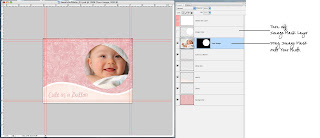
This is a very brief "How To". My templates are based on image masks, so if you know how to use image masks you're set. If not, they're not hard to learn. There are a few screen captures below as a rough idea of how to use these.
This is a very brief "How To". My templates are based on image masks, so if you know how to use image masks you're set. If not, they're not hard to learn. There are a few screen captures below as a rough idea of how to use these.
- The first layer of my files are filled with white, delete this layer, it's to reduce file size for emailing purposes.
- Drag or paste your photo into a new layer in the template.
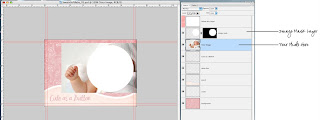
- Drag your photo to the layer below the layer named image mask.
- Drag the image mask onto your image.
- Delete the layer named image mask - once the image mask is placed on your photo you don't need the layer.
- To adjust the size of your photo without adjusting the mask - turn off the "lock" between your photo and the image mask.


September 09, 2007
*Template Copyright Info – Please Read!
For those that have purchased my templates in the past I'm going to leave this reminder of copyright notice up. Just because the store is closed does not mean copyright rules are no longer in effect!
Designs © by Neil Creative / Danielle Neil and may not be copied. These templates are for limited commercial and personal use. Limited commercial use is when a photographer uses them to sell cards to their clients. Templates are not to be resold or used for other purposes. Elements within the template (such as graphics) are not to be taken from the template to be used in other forms. Graphics and designs © Mujka Illustration or © Neil Creative.
These templates are original works and are therefor subject to copyright. You may not take a template and claim it as your own. You may not take a template and sell it to other photographers and graphic designers. You may sell these templates in coordination with your own images to your clients. By using my templates you are agreeing to these terms and conditions which are subject to change without notice. Violating these terms and conditions will result in punishment to the maximum extent of copyright law.
Designs © by Neil Creative / Danielle Neil and may not be copied. These templates are for limited commercial and personal use. Limited commercial use is when a photographer uses them to sell cards to their clients. Templates are not to be resold or used for other purposes. Elements within the template (such as graphics) are not to be taken from the template to be used in other forms. Graphics and designs © Mujka Illustration or © Neil Creative.
These templates are original works and are therefor subject to copyright. You may not take a template and claim it as your own. You may not take a template and sell it to other photographers and graphic designers. You may sell these templates in coordination with your own images to your clients. By using my templates you are agreeing to these terms and conditions which are subject to change without notice. Violating these terms and conditions will result in punishment to the maximum extent of copyright law.
Subscribe to:
Posts (Atom)


